⏱ 3-minute read · open “Read more” for the details
Most days, a bank’s payment systems run quietly. Then payday comes, or Black Friday, or the day after a long weekend. Suddenly the same systems must move far more money in the same few hours. There’s one thing I’ve learned about those days: you can’t just hope for the best. You plan for them like a big event.
Think of a highway at rush hour. On busy days you open more lanes, stop road works, put more people in the control room and let ambulances go first. Banks do the same: more computer power, no risky changes, a team watching every payment, and salaries go first.
A busy day I won’t forget
I was in the war room on a very busy day. Payment updates got stuck, yet every screen looked green.
- Every payment passed through Kafka, which hands messages from one system to the next.
- Under the load it slowed down, quietly.
- The lesson: busy days break things you can’t see, so plan for them.
Read more: A busy day I won’t forget
I was in the “war room” (the room where the whole team watches the systems) on a very busy day. Every payment in the bank passes through a system called Kafka, which hands it from one system to the next. That day, Kafka started to struggle.
Payment updates got stuck, and incoming payment files stopped moving. The strange part: on the screens, everything looked fine. The servers were up and the lights were green. But the payments weren’t moving. On a quiet day, you might not notice for a while. On a busy day, every minute means thousands more payments waiting, and the deadline doesn’t move.
The cause was simple in the end: the system ran out of memory because of the extra load. We gave it more memory and then sent the stuck files through again.
The harder part came after. Some payments still showed the wrong status, and they were fixed by hand, directly in the database, each one based on a support ticket. It worked, and the tickets showed who did what. But it taught me something: under pressure, the fastest fix is often the riskiest. A hand-made fix skips the safety checks every other system relies on.
What I learned:
- Watch three things, not one: the servers, the queues and the space. Are payments piling up? Is memory or disk running out? A server can look healthy while payments quietly pile up behind it.
- Build a safe repair tool before you need it. It should fix a stuck payment, need a payments operations manager to approve, and keep a record by itself. Then nobody has to touch the database on the worst day of the month.
Busy days don’t create new problems. They find the weak spots you already had.
One bank, four busy calendars
That day taught me something: a bank doesn’t have one busy calendar. It has four.
- Retail: people paying shops, bills and each other.
- Commercial: small and mid-size businesses paying staff and rent.
- Corporate: large companies paying thousands of staff and big suppliers.
- Wholesale: banks and markets settling with each other.
Read more: One bank, four busy calendars
A bank doesn’t have one busy calendar. It has four, because four kinds of customers move money in different ways, on different payment systems (people in payments call them “rails”), and on different days:
- Commercial: small and mid-size businesses paying staff, rent and suppliers.
- Corporate: large companies paying thousands of staff, big suppliers, tax, and moving cash between countries.
- Wholesale: banks and financial markets settling with each other, for example when government bonds or home-loan securities change hands.
| Type | Main rails | Busiest days | Busiest time of day (US Eastern) |
|---|---|---|---|
| Retail | Cards, Zelle, instant payments (RTP and FedNow), and ACH for salaries and bills | Paydays (often Fridays), Social Security days, around the 1st (rent and loans), Black Friday and Cyber Monday | Cards: evenings and weekends. Instant payments: any hour, every day. |
| Commercial | ACH and Same Day ACH, checks, some wires, instant payments | 1 to 2 business days before payday (when payroll files go out), the 1st, month-end, and the 15th, when smaller employers pay their monthly payroll tax (Monday, November 16 this year, because the 15th is a Sunday) | Just before the three Same Day ACH deadlines: 10:30 a.m., 2:45 p.m. and 4:45 p.m. |
| Corporate | Large ACH payroll files, Fedwire and CHIPS wires, SWIFT for payments abroad | Payroll file days; every Wednesday and Friday, when big employers deposit payroll tax; month-end and quarter-end; the mid-December corporate tax date; the days before and after a holiday | Wires: mid to late afternoon |
| Wholesale | Fedwire Funds, Fedwire Securities, CHIPS | Treasury settlement days (November 16 and 30 this month), mortgage-backed securities (MBS: bundles of home loans sold to investors) settlement days (a few set days each month, published by SIFMA), the last business day of the month, and the day after a US holiday | Fedwire Securities: right at the 8:30 a.m. opening. Fedwire Funds: 3:00 to 4:30 p.m. |
Holidays squeeze all four together. Wires can’t be sent on Thanksgiving, so they pile up for the next day. Last year, the day before Thanksgiving (November 26, 2025) was a record day for The Clearing House’s ACH network, at $362.9 billion. Two days later, on Friday, November 28, the CHIPS wire network set an all-time record of 1.21 million payments worth $2.97 trillion. That day was the day after Thanksgiving and also the last business day of the month.
So what actually happens on Thanksgiving Day?
Thanksgiving is a Federal Reserve holiday. Some payment systems stop for the day, and others keep running. Here is what a customer sees:
| If you… | What happens on Thanksgiving (Thursday, November 26) | When the money really moves |
|---|---|---|
| Tap a card in a shop or buy online | Works as normal: the card is approved in about a second | The shop’s bank is paid on the next business day, Friday |
| Send money with Zelle, RTP or FedNow | Works as normal, any hour | At once. These instant systems never close. |
| Expect a salary or benefit by ACH | ACH is closed, so nothing settles that day | Most employers send pay a day early, so it lands Wednesday. If a payment is dated for Thursday, it settles Friday. |
| Pay a bill by ACH | Can be scheduled, but doesn’t move | Friday, the next business day |
| Send a wire (Fedwire or CHIPS) | Closed. The bank holds the request. | Friday morning, which is why Friday is so busy for wires |
In short: what you see (an approved card, an instant transfer) keeps working. What happens behind it between banks waits for the next business day, and all of it arrives on Friday at once.
That’s why I would watch November 27 and November 30, 2026 most closely this month. The retail card peaks, Black Friday and Cyber Monday, land on the same days as wire catch-up, month-end and paydays.
A month of busy days
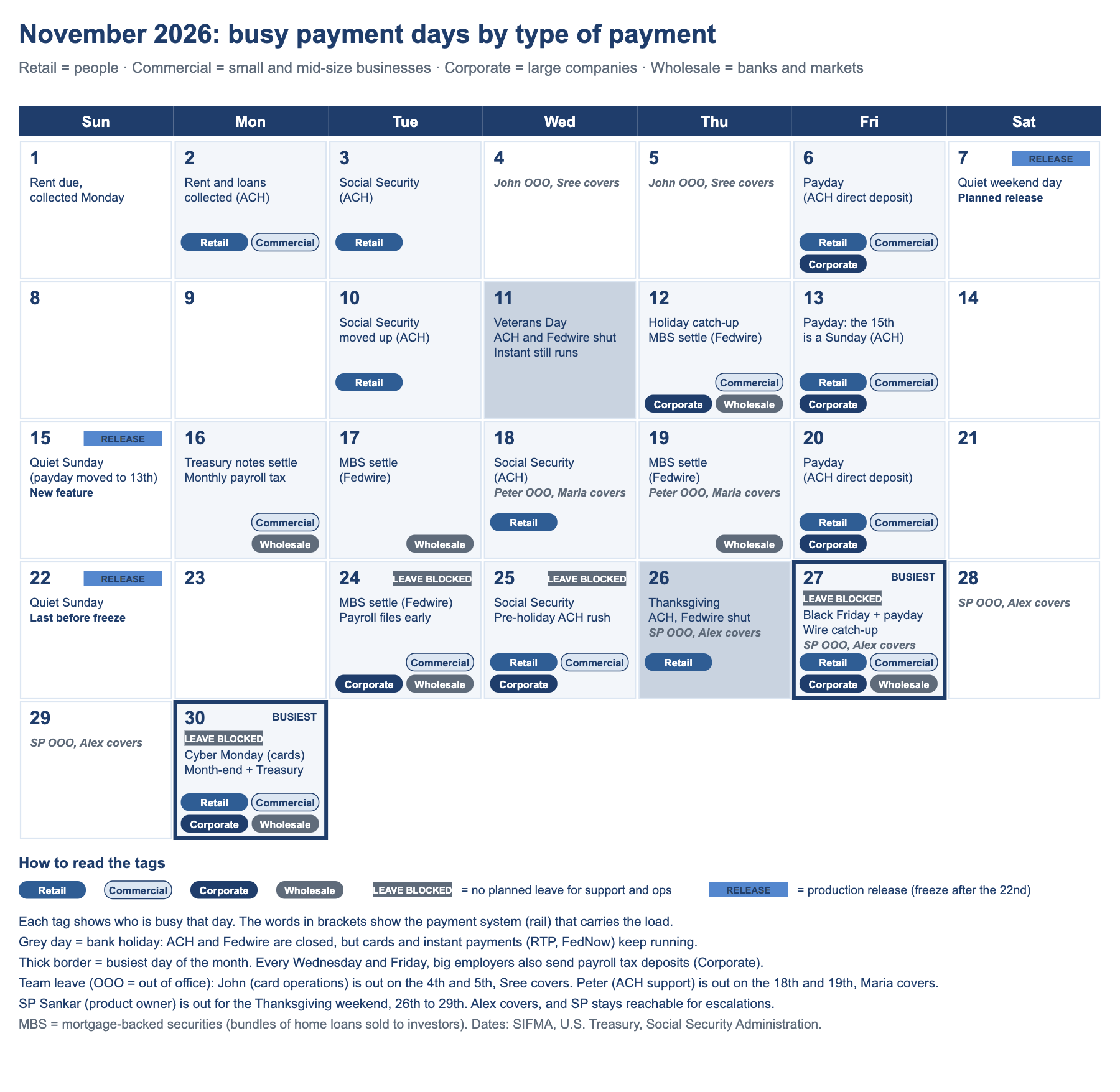
Here is this month on one calendar. The days with a thick border are the busiest.
- Tags show paydays, tax days, month-end and holidays.
- Leave is blocked on the busiest days.
- Releases go out only on safe Saturdays.
Read more: A month of busy days
The key at the bottom of the calendar explains every tag and label. Start with the two days with a thick border, November 27 and 30: they are the busiest of the month.
The busy days banks plan for
Some days are busy every year, and banks plan for them like events.
- Paydays: Fridays, the 15th and month-end.
- Social Security days and tax dates.
- Black Friday, Cyber Monday and the day after a long weekend.
Read more: The busy days banks plan for
| Day | Why it’s busy | What can go wrong |
|---|---|---|
| Paydays | Most US employers pay every two weeks (about 43%) or every week (27%). Others pay on the 15th and at the end of the month. | A late salary file means people don’t get paid on time |
| Social Security days | Benefits are paid on the 3rd and on the 2nd, 3rd and 4th Wednesday of the month. A holiday can move the date earlier. | Millions of people expect their money that morning |
| Around the 1st | Rent, loans and bills are collected | More payments bounce because accounts are empty |
| Black Friday and Cyber Monday | Americans spent a record $11.8 billion online on Black Friday 2025 and $14.25 billion on Cyber Monday, up to about $16 million a minute in the evening | Slow or declined cards, and more fraud |
| End of the month or quarter | Companies pay suppliers and close their books | Big payments stuck close to the deadline |
| After a holiday | Everything that waited arrives at once | Long queues on the first working day |
Before the busy day: a simple six-week plan
About six weeks before, the work starts.
- Check last year’s volumes and set a target.
- Load test with extra volume and fix what breaks.
- Freeze changes and confirm who is on duty.
Read more: Before the busy day: a simple six-week plan
| When | What the bank does |
|---|---|
| 6 weeks before | Look at last year’s busiest day, add growth, and put every busy day in one calendar. |
| 4 weeks before | Test the systems with two to three times the expected number of payments, and find the slowest part. |
| 2 weeks before | Add computer power, stop all new releases, and check contact numbers for the bank’s partners. |
| 1 week before | Ask big companies to send their salary files a day or two early. Share the support rota. |
| The day before | Check every system, clear old queues, and confirm tomorrow’s deadlines. |
The change freeze: no new releases
Around the busiest days, banks stop changing the live system.
- What stops: new features, upgrades and big configuration changes.
- Still allowed: emergency fixes for a live problem.
- Done before: anything the busy days need.
Read more: The change freeze: no new releases
Around the busiest days, banks stop putting changes into the live system. This is called a change freeze (some teams say “blackout”). Many card teams freeze from mid-November to early January, because Thanksgiving, Black Friday, Cyber Monday, the holidays and year-end all fall in that window.
The calendar shows three releases before the freeze. The planned release goes in on Saturday, November 7, not Friday the 6th. The 6th is a payday, with payroll files moving all day. A Saturday has far fewer payments, so a problem touches fewer customers and there is time to fix it before Monday. The new feature follows on Sunday, November 15. It moved off Friday the 13th for the same reason: that Friday is also a payday, because the 15th falls on a Sunday. The last release is on Sunday, November 22. After that, only emergency fixes go in until early January. That last release is the riskiest. It lands two days before the leave-blocked days start, so it must be small, fully tested, easy to undo, and watched closely on Monday the 23rd.
- What stops: new features, upgrades, big configuration changes and infrastructure work.
- What is still allowed: emergency fixes for a live problem. They need senior approval, a tested way to undo them, and the right people watching when they go in.
- What gets done before: anything needed for the busy days (more capacity, fixes from last year’s review) is finished, tested and live a few weeks earlier.
The reason is simple: on a quiet day, a bad release hurts a few customers. On Black Friday or payday, it hurts millions, and there’s no quiet hour to fix it.
Who’s in, who’s out: leave and cover
Systems are only half the story. The other half is people.
- No planned leave for payments staff on the busiest days.
- Other leave is approved early, with named cover.
- Never leave one person as the only one who knows a process.
Read more: Who’s in, who’s out: leave and cover
Systems are only half of a busy day. The other half is people. A perfect war room plan fails if the one person who knows the ACH file process is away that week. So banks plan leave (time off, or “OOO”, out of office) as carefully as they plan capacity.
- Block leave on the busiest days: no planned leave for payment support and operations around the peaks. This month that means November 24, 25, 27 and 30.
- Approve other leave early, with named cover: every person who is out has one named backup who knows their work.
- Hand over properly: a short note on open issues, files due and who to call, sent before the person leaves.
- Update the contact list: the on-call rota, escalation numbers and OOO messages all point to the person covering.
- Never leave a single point of failure. If only one person can do a job, train a second one before the busy season, not during it.
Here is what that looks like on a simple team calendar (the names are examples):
| Role | Person | Out of office | Cover | Handover done? |
|---|---|---|---|---|
| Card operations | John | November 4 to 5 | Sree | Yes |
| ACH support (L2) | Peter | November 18 to 19 | Maria | Yes |
| Wire operations | Priya | None in November | Not needed | Not needed |
| Product owner | SP Sankar | November 26 to 29 (Thanksgiving weekend) | Alex, with SP reachable for escalations | Yes |
| Release manager | Sam | November 9 to 10 | Alex | Yes |
| Payment support, onshore (US daytime) | Whole team | Leave blocked November 24, 25, 27 and 30 | Offshore team covers US night hours | Shift plan shared |
| Payment support, offshore (US night hours) | Whole team | Leave blocked on the same days, in their local time | Onshore team covers US daytime | Shift plan shared |
Don’t forget the offshore team. Payments don’t stop when the US goes to sleep. Overnight ACH files are built and sent, instant payments run every hour, and card spending goes on all evening. Most banks hand support from one time zone to the next, so the offshore team watches the systems during US night hours. The leave block must apply to them too. Two things to plan. US holidays like Thanksgiving aren’t holidays where the offshore team works, so they can cover those days, with an onshore person on call. And their own holidays fall on different dates, so put them on the same calendar before approving leave.
Peter’s days off fall on a busy week (Social Security on the 18th, home-loan securities settling on the 19th), so his cover is named and his handover is done before he leaves. I’m out over the Thanksgiving weekend too. The leave block covers support and operations, who run the payments on the busiest days. As product owner, I make sure Alex has a full handover, the war room knows how to reach me, and any big decision has a clear owner while I’m away. That’s the whole idea: busy days are on the calendar, so leave should be too.
On the day: the war room
On the day, the team works from one room and one screen.
- If a system slows down, payments wait in line instead of failing.
- Salaries go first.
- The fraud team stays alert, and customers hear early if something is slow.
Read more: On the day: the war room
- One room, one screen: the support team watches one dashboard that shows how many payments are flowing, how many are waiting, and any errors.
- Wait, don’t fail: if a system slows down, payments wait in line instead of being rejected.
- Salaries first: payments with a deadline go before work that can wait, like reports.
- Slow down the heavy senders: big companies sending huge batches are slowed down, so they don’t block everyone else.
- Watch for fraud: scammers like busy days. The fraud team stays alert without blocking real customers.
- Tell people early: if something is slow, customers should hear it from the bank first, not from social media.
When it breaks: real payment outages
Payment systems do fail, even at central banks and the biggest banks. This list grows when a new outage is confirmed, newest first.
- Most outages are fixed the same day. The damage comes from the backlog, duplicates and silence.
- The best responses name the cause, say what still works, and confirm when it is fixed.
| Date | Who | What happened | How it was handled | Source |
|---|---|---|---|---|
| 16 Nov 2026 | JPMorgan Chase | A software bug in on-premise hardware slowed transactions online and in branches; other banks slowed only on payments involving Chase. | Said publicly it was not a cyberattack, told customers they could still reach their money, fixed it the same day. | CNBC, NBC News |
| 27 Jan 2026 | Reserve Bank of Australia (low-value settlement) | An expired security certificate cut the file-transfer link for about 7 hours; later, duplicate files blocked property settlement. | Fix tested before use, operating hours extended to 22:45, 126 duplicates fixed by hand, eight follow-up actions published. | RBA incident report |
| 2–3 Nov 2023 | The Clearing House (EPN, US ACH) | A manual error in one file masked customer names and account numbers; about 850,000 deposits were delayed for days. | The Federal Reserve alerted banks, senders resent the payments, and banks such as Chase refunded overdraft fees. | CBS News, PaymentsJournal |
| 14 Aug 2023 | Bank of England (RTGS and CHAPS) | A technical issue stopped the high-value payment system from opening for about six hours. | Restored around midday; the Bank confirmed all CHAPS payments settled that day. | Bank of England statement |
| 20 Oct 2014 | Bank of England (RTGS and CHAPS) | A problem during routine maintenance kept CHAPS down for several hours. | The most important payments were made by hand; the Governor ordered an independent review. | Finextra, Central Banking |
Read more: the latest outage in detail, and what to do
Latest: JPMorgan Chase, 16 November 2026
- The trouble started on Monday morning. Customers reported problems viewing balances and making transfers, including wire transfers, online and in branches.
- Customers of other big banks also saw errors, which started rumours of a wider attack.
- Just before 4 p.m., Chase posted a statement: “a temporary issue related to a software bug in on-premise hardware systems”, not cyber-related.
- The bank said all customers still had access to their accounts and money, though some transactions took longer, and it aimed to fix the issue by the end of the day.
- Chase said it was not a system-wide problem: other banks were slowed only where they were part of a transaction with Chase.
- By the evening, Chase said transactions were back to normal.
What good handling looks like
- Say the cause early, and what it is not. “Not a cyberattack” stopped the rumours spreading across banks.
- Tell customers what still works. “You can still reach your money” matters more than the technical detail.
- Keep it contained. One bank had a bad day; the payment systems between banks kept running.
- Give a time, then confirm. “By end of day”, followed by “back to normal”.
If it happens at your bank on a high-value day
- First 15 minutes: open the war room, stop all releases, and check whether the problem is yours or the payment system’s (for example Fedwire or CHIPS status).
- Protect the payments that cannot wait: settlement obligations, CLS pay-ins, payroll, house closings, tax payments. Queue the rest, and use the contingency channel agreed with the payment system operator.
- Watch the money: tell treasury early. If you will miss a cut-off, ask the operator about an extension in good time.
- Talk often: one status message for customers and staff every 30 to 60 minutes, and tell regulators as your rules require.
- Don’t create a second incident: when systems come back, reconcile before you resend. Duplicate payments are the classic second wave.
- After: find the root cause, refund any fees customers suffered, and test the fix before the next busy day.
For tech readers: Make every resend idempotent, keyed on UETR and EndToEndId, so a replay can never pay twice. Use durable replay queues instead of re-submitting by hand, circuit breakers between channels and the payment hub, and a disaster-recovery failover you have actually tested under peak load. Keep firmware and hardware changes inside the change freeze, and watch business signals (payments settled per minute), not just server health, since screens can stay green while money stops.
Sources: CNBC · NBC News · AP via Times Union · Bloomberg · CBS News (all 16 November 2026)
Deadlines: the clock that matters most
On a busy day, the biggest risk isn’t a crash. It’s missing a deadline.
- A late salary file means people get paid a day late.
- Same-day ACH has fixed windows through the day.
- Banks set their own cut-off 30 to 60 minutes early, so there is time to fix a bad file.
Read more: Deadlines: the clock that matters most
On a busy day, the biggest risk isn’t a crash. It’s missing a deadline. A salary file that misses its deadline arrives a day late, and people notice. For same-day bank transfers (called Same Day ACH), there are three deadlines every working day, in US Eastern time:
| Window | File must arrive by | Money moves at |
|---|---|---|
| Morning | 10:30 a.m. | 1:00 p.m. |
| Afternoon | 2:45 p.m. | 5:00 p.m. |
| Late afternoon | 4:45 p.m. | 6:00 p.m. |
Each of these payments can be up to $1 million. Banks set their own deadline 30 to 60 minutes earlier, so there’s time to fix a bad file.
After the busy day
When the day is over, the work isn’t.
- Check that everything matches.
- Clear the backlog of returns and complaints.
- Talk about what nearly broke, and write it down.
Read more: After the busy day
- Check everything matches: every payment sent, received and returned.
- Clear the backlog: returned payments and customer complaints that piled up.
- Talk about it: what was slow, what nearly broke, and what to fix before the next busy day.
- Write it down: so next time the fix is faster, or automatic.
Want to see the full journey of a payment? Read How a US Payment Works: 15 Steps Inside a Bank.
If you remember one thing
Busy days are on the calendar, so problems on busy days usually mean poor planning, not bad luck. Know the dates, test with extra volume, stop risky changes, staff the war room, and make sure salaries arrive on time.
Working on a payments project?
I help banks and fintechs deliver real-time payments, ISO 20022, and AI-driven AML and compliance change, from strategy to go-live.
Connect on LinkedInSee how I can help